Room calendar ✓ works
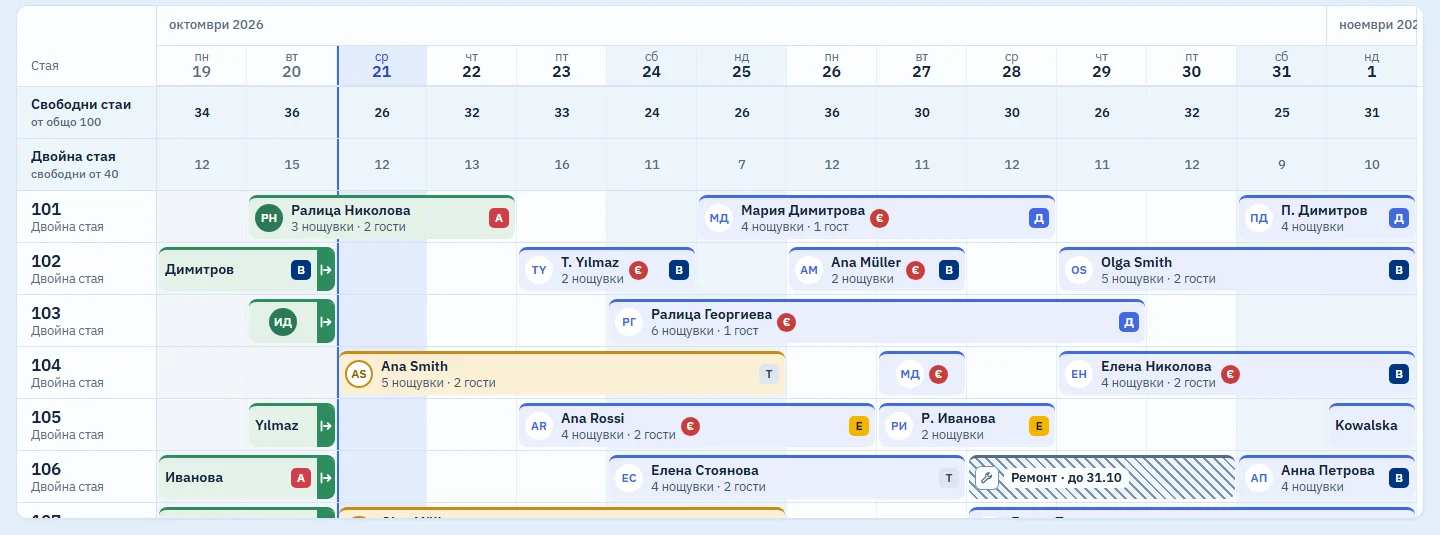
Rooms are rows and days are columns. You book, move, check in and cancel from here, and the calendar never switches to another screen.

Never puts two bookings in one room on the same night
The nights are checked on every save and every move. A booking that has no room yet waits in the Unassigned strip above the rooms until you give it one.
Takes a room out of order without a fake booking
A room under repair or maintenance comes off sale for set dates, with a reason. You start from the room number on the calendar, from the Rooms tab or from the Ctrl+K command palette. On the calendar the room is hatched, with a spanner and a label such as “Repair · until 25.10”.
This is not a booking. The room counts neither as occupied nor as free, and no booking can be saved over it. Ctrl+Z undoes a mistake.
Asks before a move changes the price
You drop the booking's bar in another room or on other dates. If that changes the room type or the price, a bar with the difference appears at the bottom, and nothing is saved until you confirm.
You can do the same without a mouse, from “Change” in the booking panel. Every change can be undone with Ctrl+Z or with “Undo” in the notice.
Zooms like a map, from a single day to a year
The views are Day, Week, 2 weeks and 1 month, and under More there are 2, 3, 6 and 12 months. Ctrl and the mouse wheel zoom in on the day under the pointer. The calendar remembers the last view you used.
Example: 7:40 in the morning, and you are taking over the shift. The board says 27 guests arrive today and none has checked in yet. You click that tile, and only those 27 bookings stay bright on the calendar while the rest fade. Esc brings them all back.

What it does not do (yet)
- It does not work offline. Later the calendar will stay visible, read-only, and check-ins will wait for the connection to return. There will be no new bookings or moves offline, because the channels keep selling.
- It does not receive bookings from Booking.com or other channels: the channel connection is coming soon.
- There is no phone view for housekeeping or for the owner. For now, housekeeping status is set in the Rooms tab at the front desk.
Included in the monthly price, at no extra cost
One monthly price: a base fee for the property and a fee for each room. There are no tiers and no add-on modules: every part that starts working joins the same price. We will publish prices at launch.
Short answers
How can I tell that a guest owes money?
From the red € mark on the bar. Colour is never the only signal: every status also has a shape or a symbol, so it reads just as well for people who cannot tell colours apart.
What does “No-show?” on the board mean?
Bookings whose arrival date has passed without a check-in. The room is held but does not count as occupied. The panel offers two ways out: “Check in (arrived late)” and “Cancel as no-show”.
Does it remember the view?
Yes. The calendar opens at the zoom level you last used on that device.
Related parts
Look round the system in the demo
A sample hotel with 100 rooms. While the system is in development, demo access is available on request.