hotelalldeskAsk for demo access

Bookings with a price ✓ works

Click a free cell on the calendar and the booking starts from that room and date. No booking is saved without a price.

The New booking panel in four steps: 1. dates for 3 nights and 2 adults, with a two-month calendar below that highlights the stay and hatches the nights with no free room; 2. “4 free rooms for 3 nights”, grouped by type, with room 206 (Double room) selected; 3. the guest, Maria Petrova; 4. a price of €95 per night, €285.00 in total for 3 nights.
The dates are typed or picked in the small calendar. The panel then lists only the free rooms, by type, followed by the guest and the price: €95.00 per night, €285.00 in total for 3 nights · Real screen, sample data (interface in Bulgarian)

Works out the nightly price from the total, and the other way round

One figure is stored: the total, in cents. You enter it per night or in total, and the other is shown read-only. When the total does not divide evenly by the nights, the nightly price is marked “average”.

Example: A guest from Thessaloniki wants room 204 for 23–25 October 2026 at €185 in total. You choose “Total” and type 185, and the system shows €92.50 per night.

Starts from the cell you click

The room and the arrival date are already filled in. You choose the dates by dragging across the calendar, with two clicks in the small calendar in the panel, as on airline websites, or by typing them, e.g. 23.10.2026. The small calendar hatches the nights with no free room and shows the number of nights straight away.

A new booking also opens from the keyboard: Ctrl+K, then “New booking”.

Fills in the price from the rates when the hotel opts for it

In the hotel settings you pick one of two options: a new booking's price comes from the rate for the room type and season, night by night, or it is entered by hand.

A price typed in by the front desk is never overwritten. If you later change the room or the dates, the system only suggests the rate price.

Changes the agreed price once you confirm

“Change” in the panel lets you alter the room, the dates, the guests and the price. The change is saved once you confirm it and can be undone with Ctrl+Z. Payments already made are kept, and the folio is recalculated.

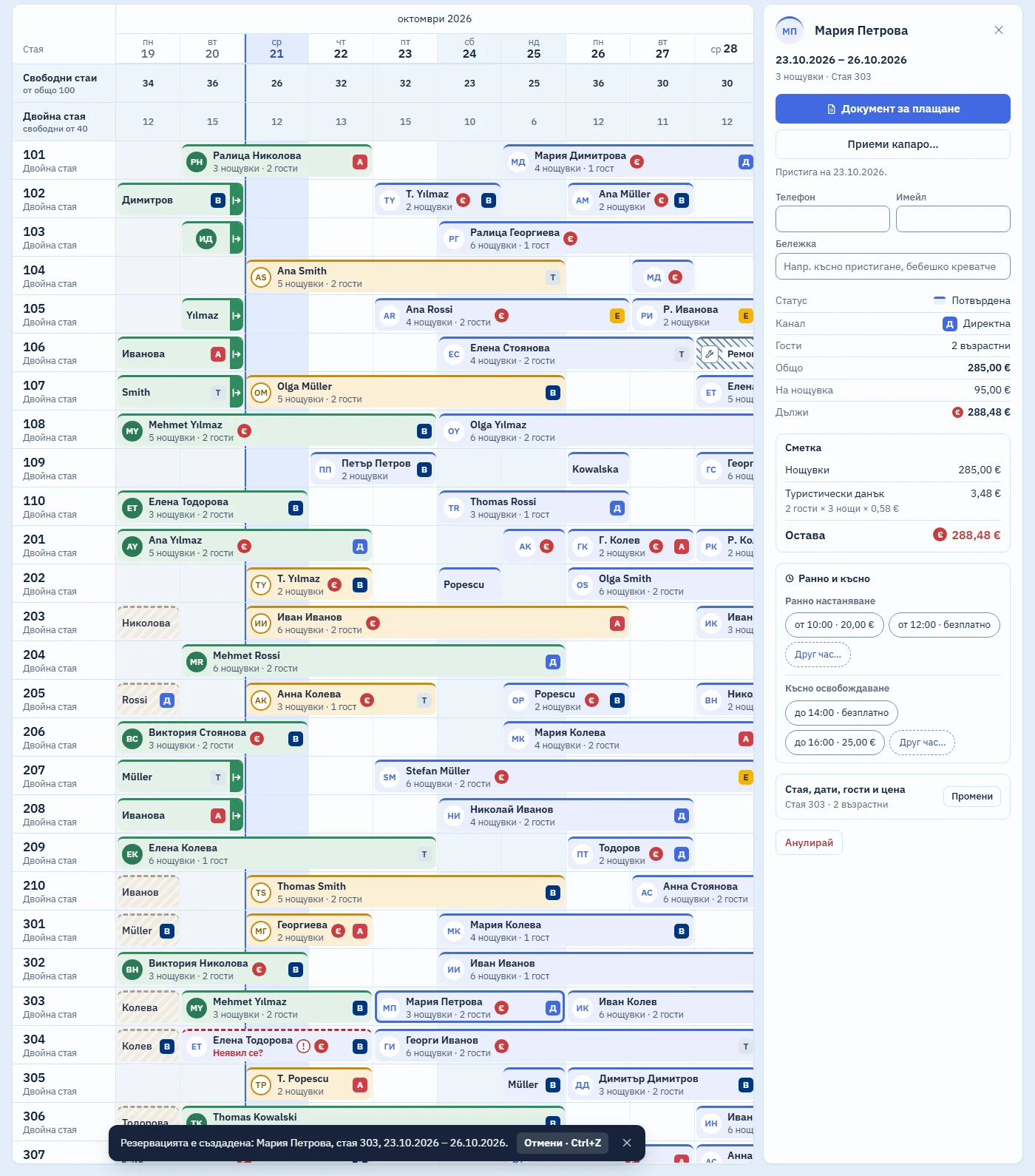
The Early and late block in the booking panel: early check-in “from 10:00 · €20.00”, “from 12:00 · free” and “Other time…”; late check-out “until 14:00 · free”, “until 16:00 · €25.00” and “Other time…”.
Early check-in and late check-out in one click. The options in the demo are examples; each hotel enters its own times and prices · Real screen, sample data (interface in Bulgarian)
The calendar with the new booking panel for Maria Petrova, room 303, and the notice “Booking created”.
Real screen, sample data (interface in Bulgarian). A new booking: the dates, then only the free rooms by type, the guest, and €95.00 per night. The total of €285.00 for 3 nights is worked out for you. One click on “Create” and the booking is on the calendar.Dates, a free room, the guest and €95.00 per night: the €285.00 total follows by itself.Animation on the real screen: in the New booking panel the dates are typed and the small calendar highlights the stay; the free rooms appear by type, a room is chosen and the guest's name typed; the price from the rate is replaced with €95.00 per night, and the total of €285.00 is worked out automatically. After “Create” the bar unfolds on the calendar.
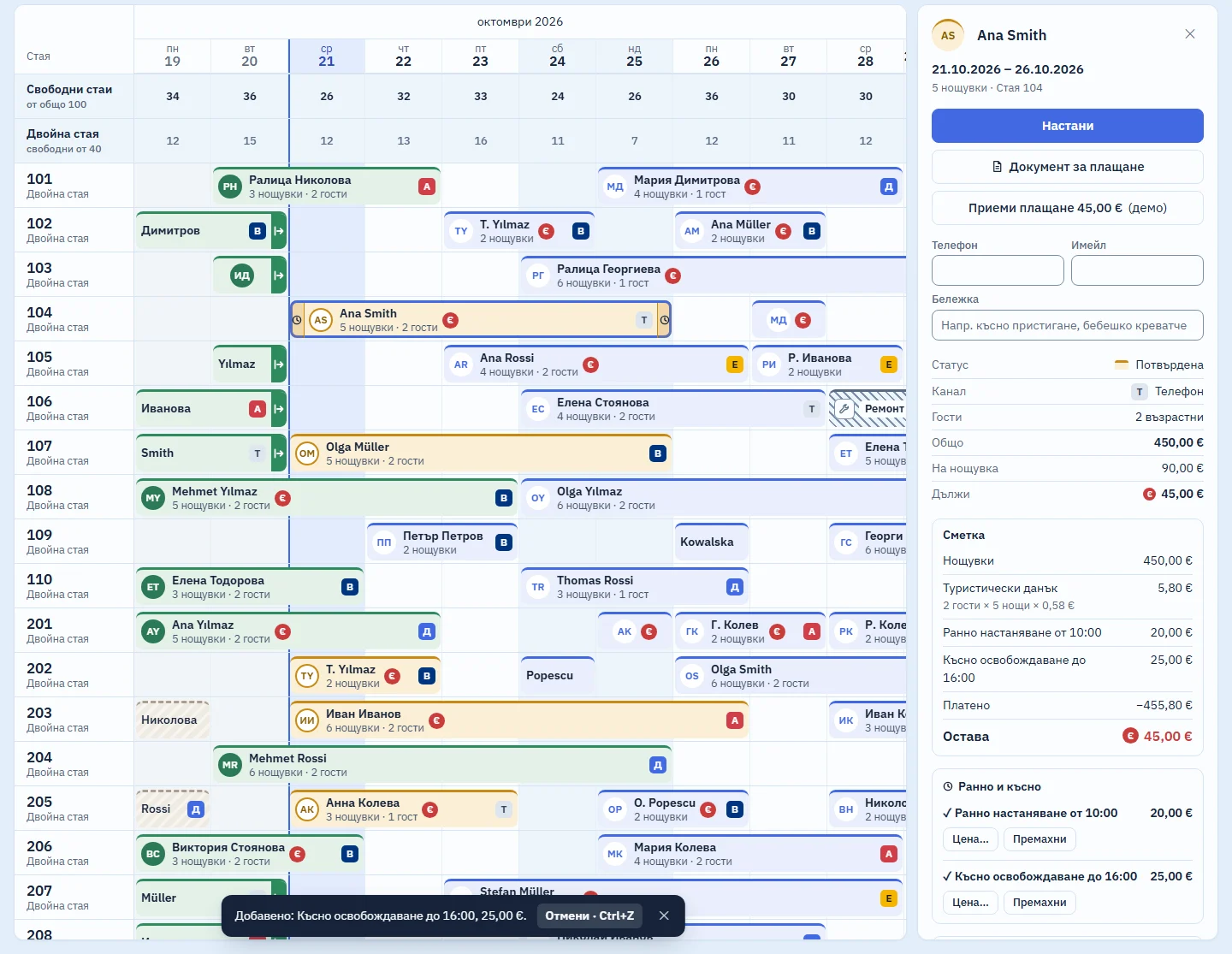
The calendar with Ana Smith's booking panel: in the Early and late block, early check-in and late check-out are selected with their prices, and the bar on the calendar has a clock.
Real screen, sample data (interface in Bulgarian). Early check-in “from 10:00 · €20.00” in one click: the €20.00 fee goes onto the guest's folio as a line of its own, and a clock appears on the bar in the calendar. Then late check-out “until 16:00 · €25.00”. The times and prices in the demo are examples; each hotel enters its own.Early check-in for €20.00 and late check-out for €25.00, each on its own line. The prices in the demo are examples.Animation on the real screen: in Ana Smith's booking panel, “from 10:00 · €20.00” is chosen, then “until 16:00 · €25.00”. Each fee appears as a separate line on the folio and the balance due grows; a clock appears on the bar in the calendar, and a notice with “Undo · Ctrl+Z” at the bottom.

What it does not do (yet)

  • It does not email a confirmation to the guest.
  • It does not charge cards online. The deposit is paid at the hotel, by bank transfer or through the channel, and recorded on the guest's folio.
  • There are no group bookings for several rooms at once.

Included in the monthly price, at no extra cost

One monthly price: a base fee for the property and a fee for each room. There are no tiers and no add-on modules: every part that starts working joins the same price. We will publish prices at launch.

How the price will work

Short answers

Can the price differ from night to night?

A booking stores one total. When the price comes from the rates, it is calculated night by night, using each night's season. When the total does not divide evenly, the bill puts the nights on two lines so that it adds up to the cent.

When are the guests' names and documents entered?

At check-in. The booking holds the number of adults and children.

Look round the system in the demo

A sample hotel with 100 rooms. While the system is in development, demo access is available on request.