Bookings and check-in, right on the room calendar.
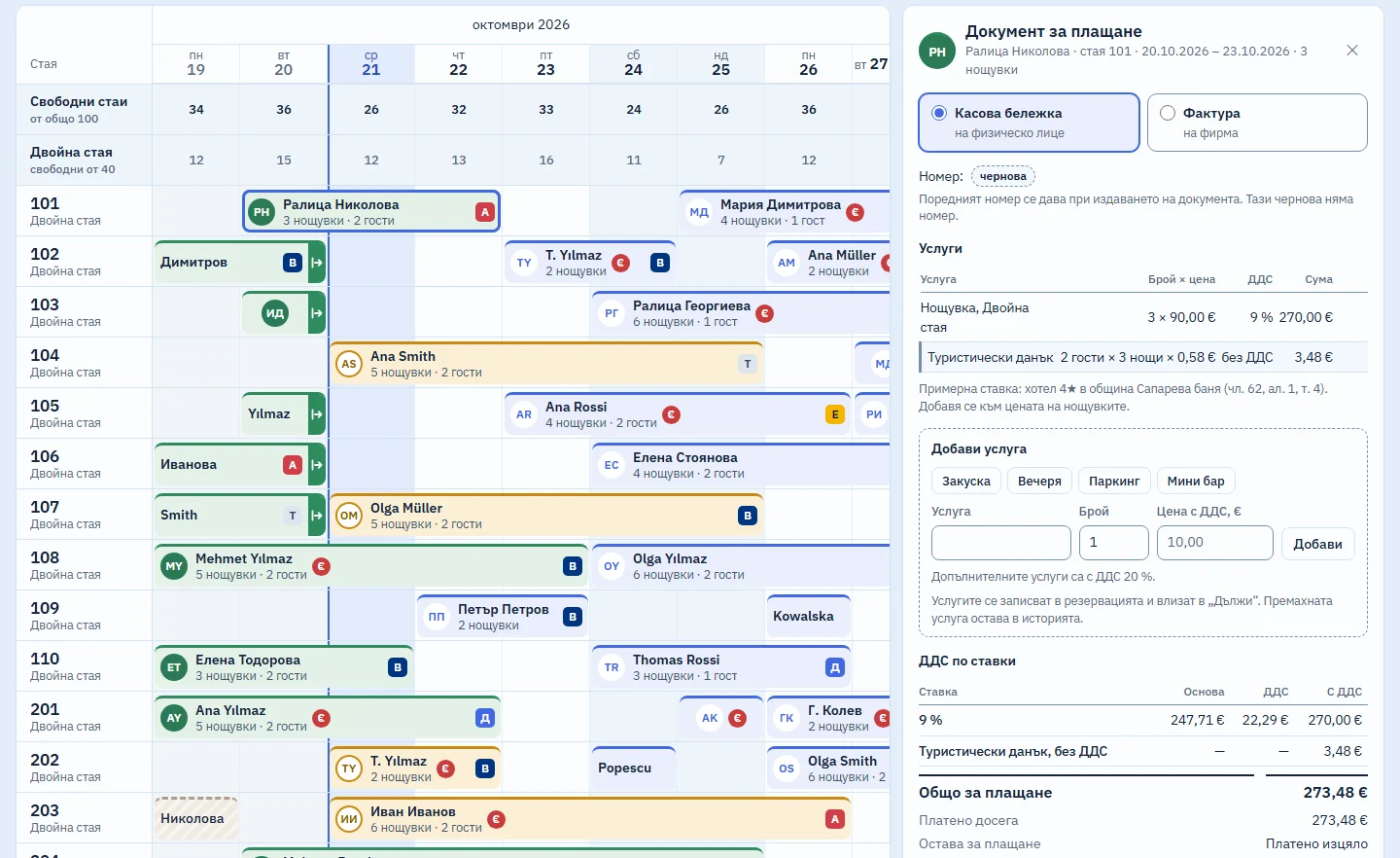
Cloud software for hotels in Bulgaria. Every room is on screen two weeks ahead, and you take a booking with its price and check the guest in without leaving the calendar. The interface is in Bulgarian; an English version is coming soon.
HotelAllDesk is in development and not yet on sale. Demo access, with sample data, is available on request.
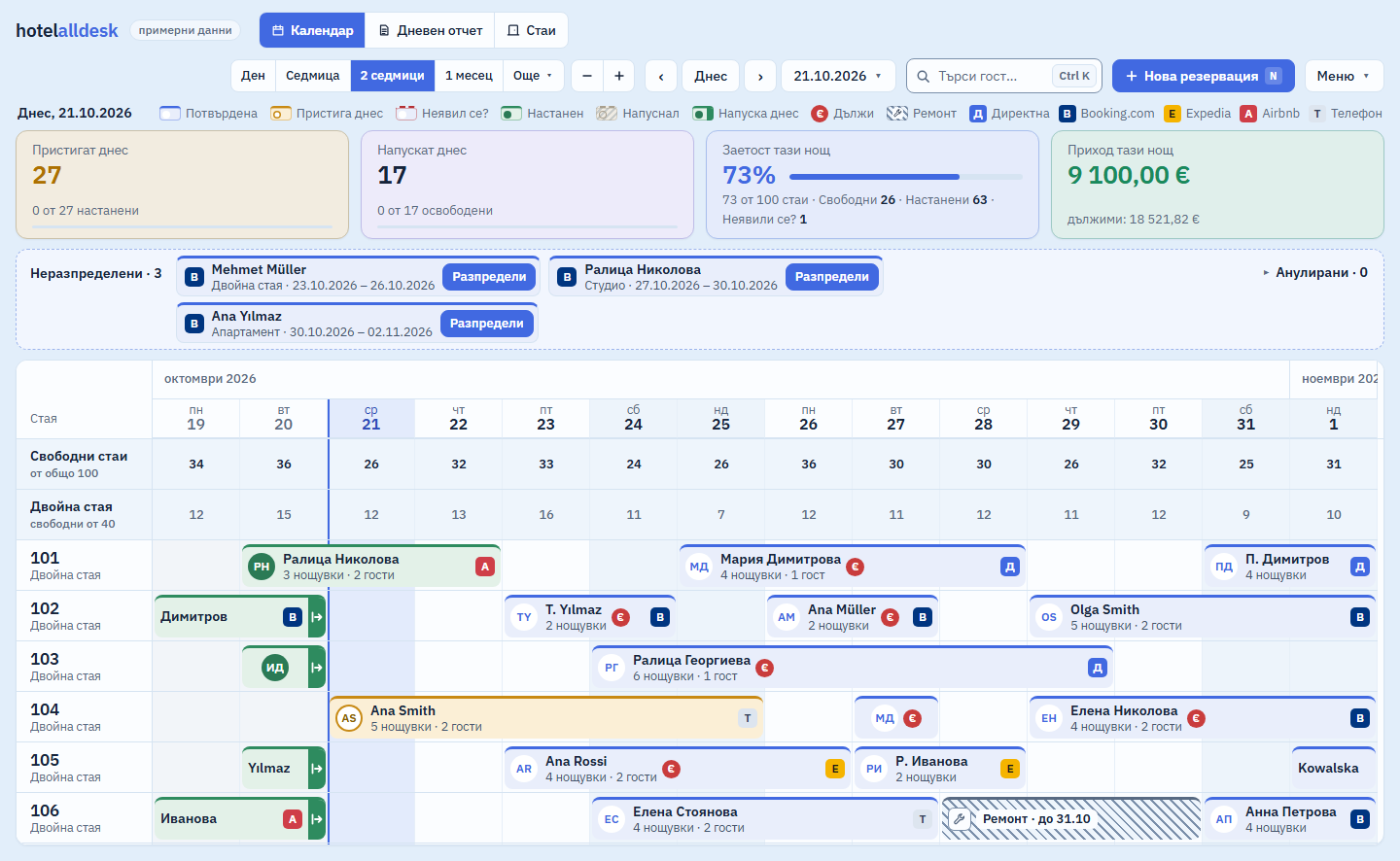
In short: No double bookingsPrice in total and per nightTourist tax on its own lineESTI submission soon
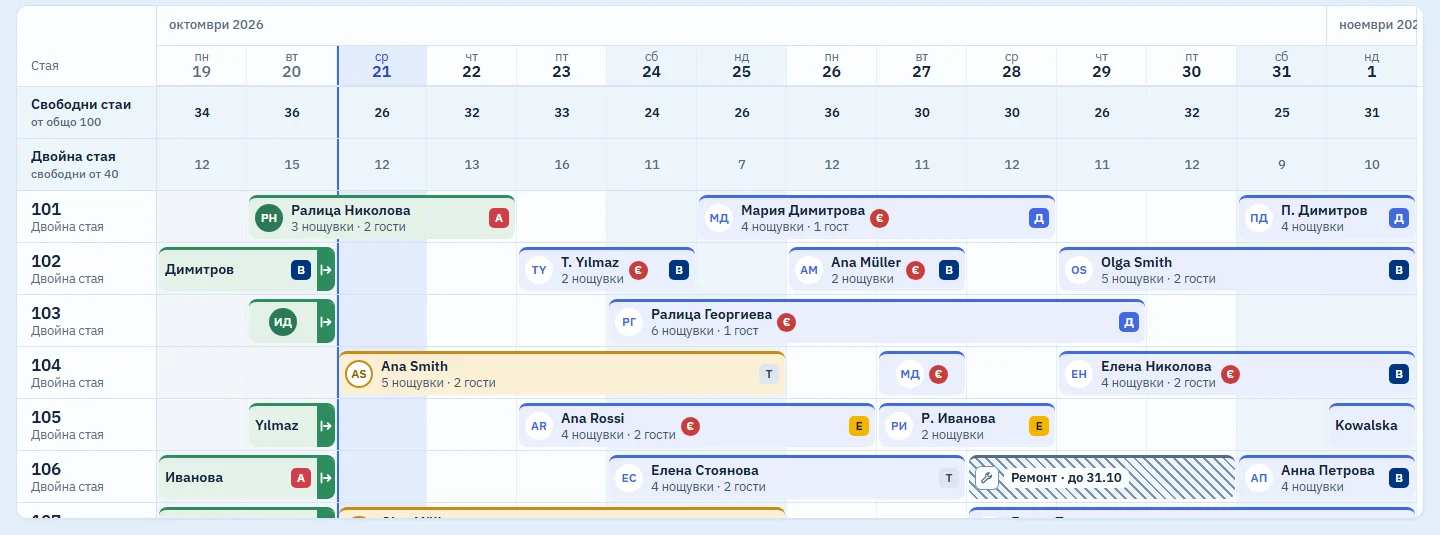
Shows the whole hotel for two weeks on one screen
A board above the rooms shows today's arrivals and departures, occupancy and tonight's revenue. You drag a booking to another room or to other dates. If the move changes the price or the room type, the system shows the difference first and waits for you to confirm.
Two bookings in the same room on the same night cannot be saved. Ctrl+Z undoes a wrong move.
- Bookings without a room wait in the Unassigned strip at the top.
- Money owed shows as a red € mark, not only as a colour.
- “Today” zooms in on today, and Esc takes you back to where you were.
- An out-of-order room is hatched, marked with a spanner and taken off sale.
Refuses to save a booking without a price
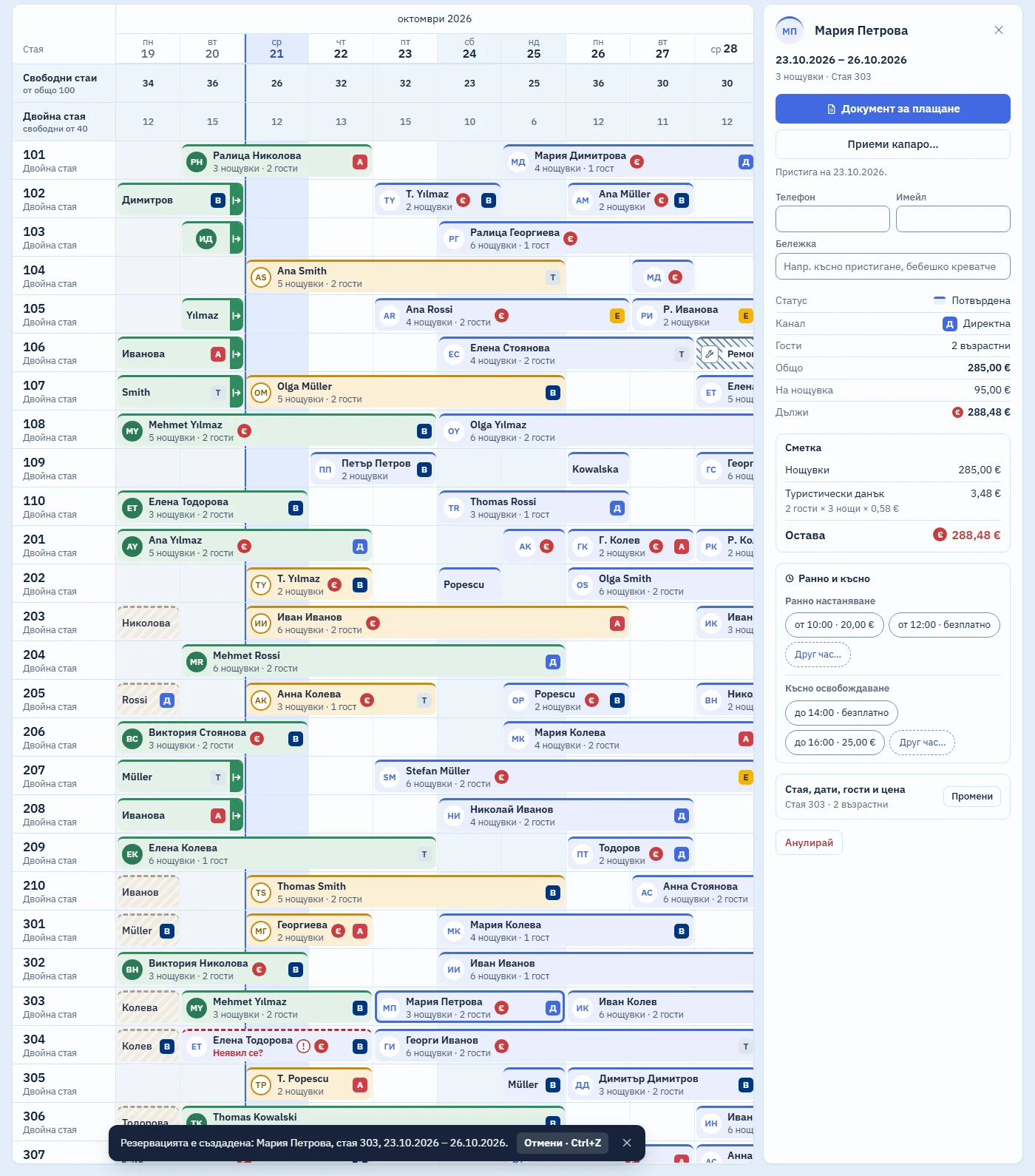
You enter the price per night or for the whole stay. The system works out the other figure and shows it read-only, so the two can never disagree.
Beside the guest count you see how many people the room sleeps. If the hotel prefers, the price is filled in from its rates, and the front desk can still change it.
Example: A guest from Thessaloniki wants room 204 for 23–25 October 2026 at €185 in total. You choose “Total” and type 185, and the system shows €92.50 per night.
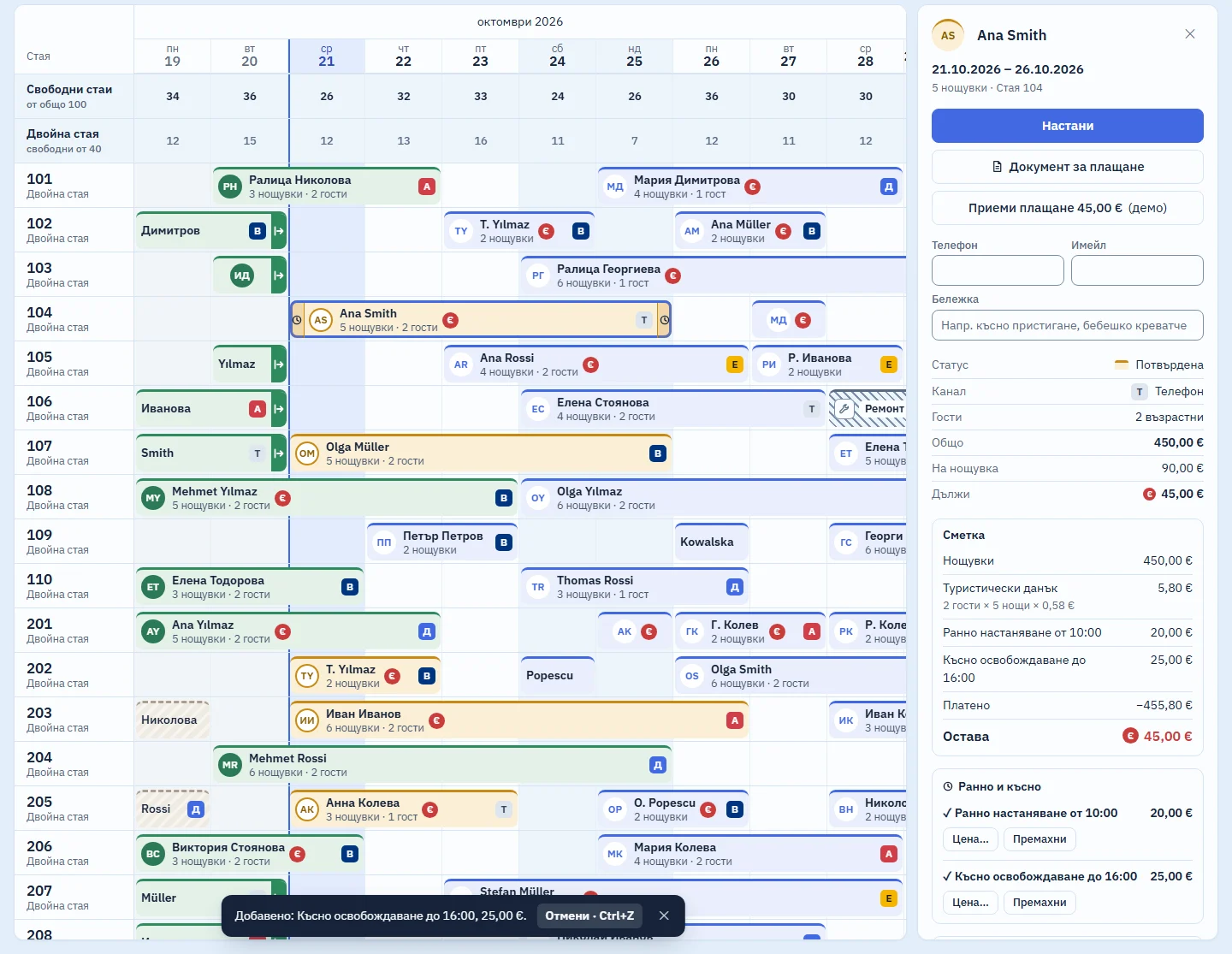
Adds early check-in and late check-out in one click
The times and prices are the hotel's own: you enter them in the settings, and the list starts empty. The fee is a separate line on the guest's folio and on the bill, and the booking's bar on the calendar shows a clock.
Checks the guest in with the details from their ID
“Check in” opens a form with the fields required by ESTI, the state system where every Bulgarian hotel registers its guests. There is one block per guest: the names, the EGN or LNCh (Bulgarian personal numbers for citizens and for foreign residents), sex and date of birth, and the document's type, number, issuing country and issue date. Enter an EGN, and the date of birth and sex fill themselves in.
The details are copied from the document by hand. The system does not scan it and keeps no photo or copy. Sending the data to ESTI is coming soon.
On the day of departure, “Check out” puts the room back on sale. If the guest leaves early, the system first tells you which nights are released. If money is still owed, it tells you how much and asks before going on.
Sorts today's work into tasks
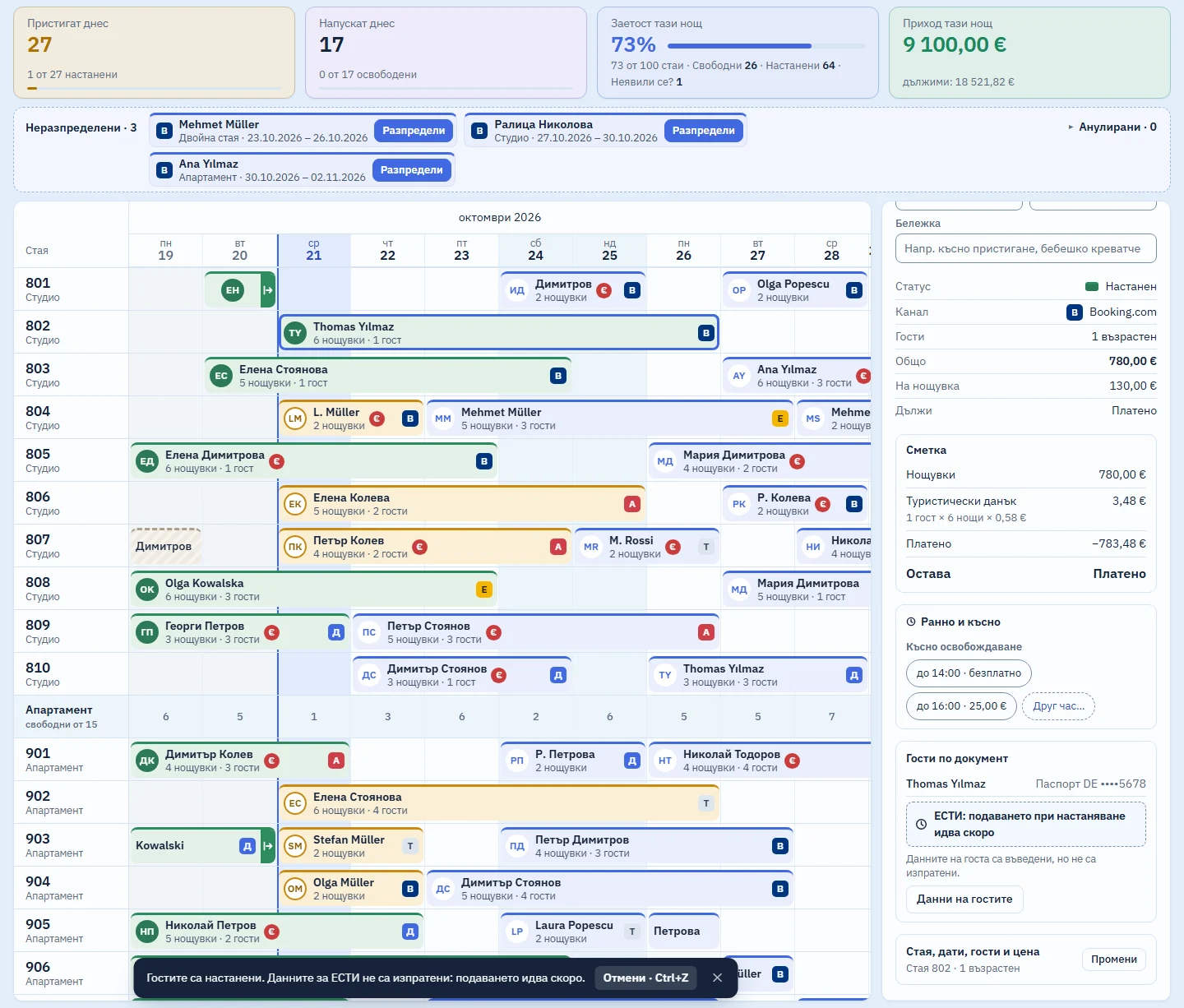
In the Day view, the “by task” button groups the rooms: who is arriving, who has not shown up, who is leaving, who is staying, and which rooms are free. Each row carries the button for the next step.
Frees the room on cancellation without deleting the booking
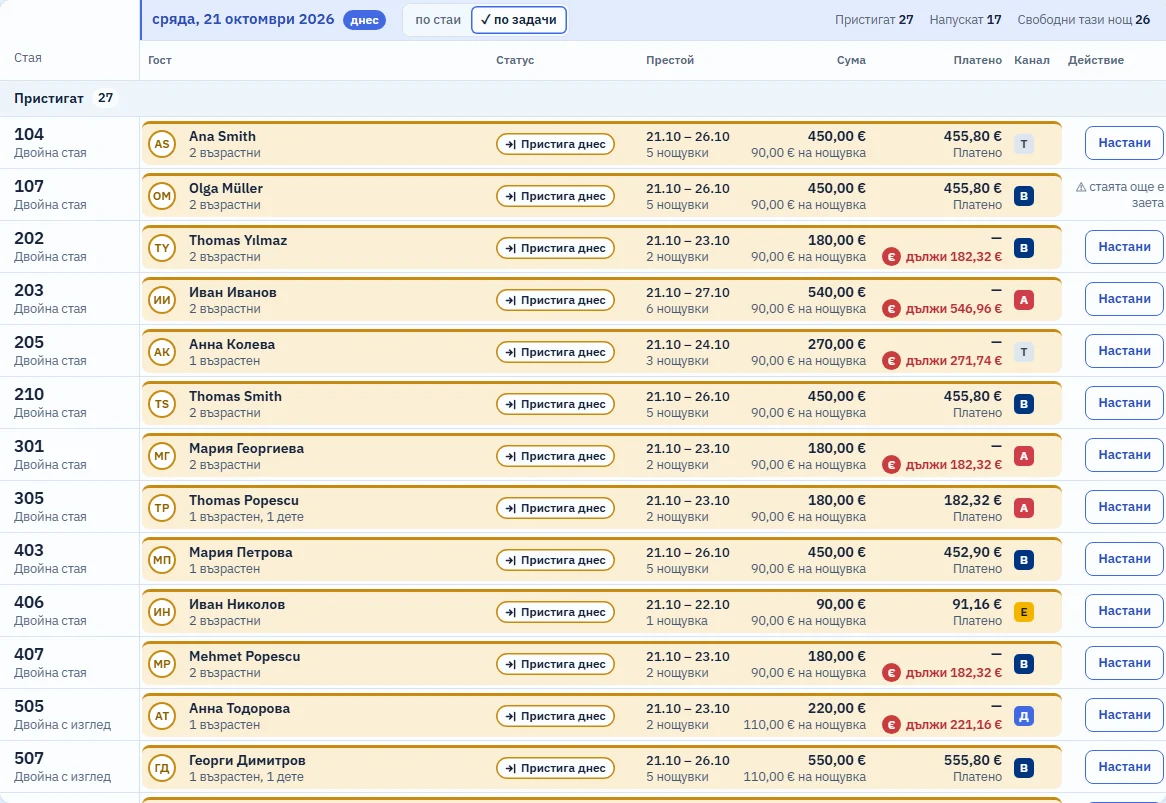
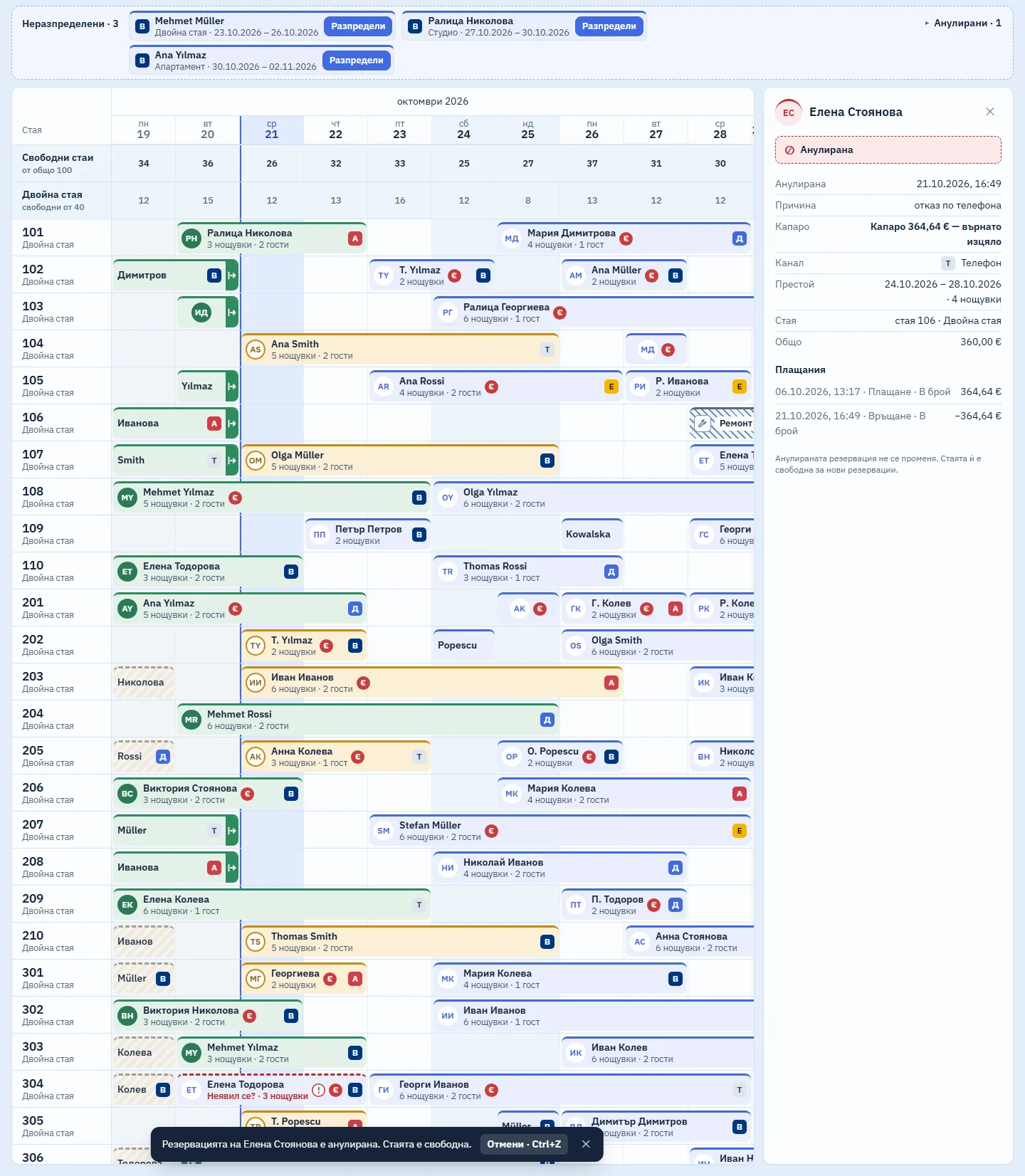
The cancelled booking moves to the Cancelled list with the reason, the date and the name of whoever cancelled it.
If a deposit was paid, you record whether it is kept or refunded. A refund is a separate payment, and the deposit stays on record.
Finds a guest and runs commands from the keyboard
Type a name into the search box and only the matches stay bright on the calendar; Enter jumps to the next one.
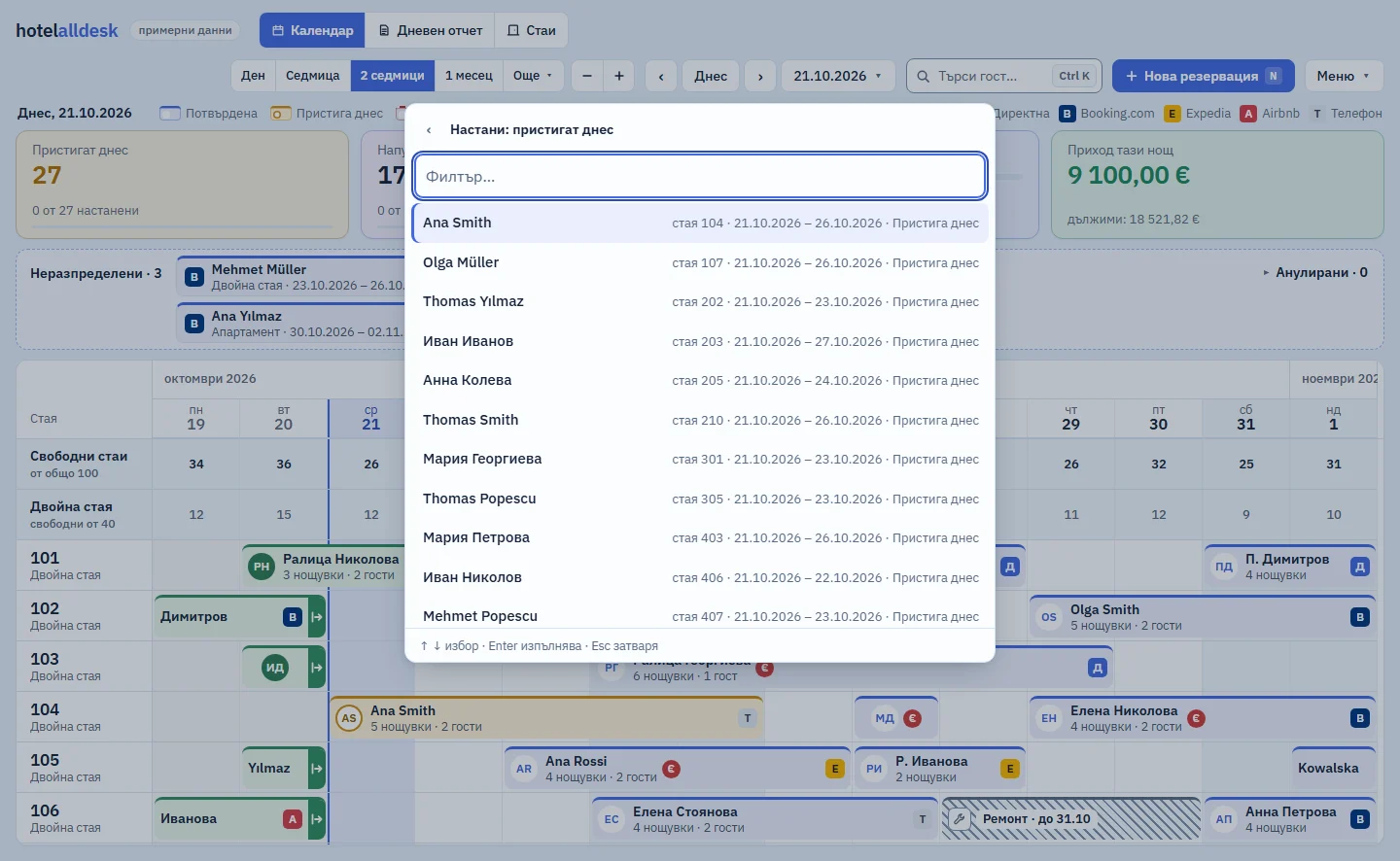
Ctrl+K opens the commands: “New booking”, “Go to date…”, “Check in…”, “Check out…”, “Bill…”. The first letters are enough: typing “нас” finds “Настани…” (Check in…).
These parts are not ready yet
We list them because a hotel in Bulgaria cannot do without them. The “soon” label comes off only when a part actually works in the system.
ESTI submission soon
Registrations, changes and cancellations sent through RegiX as they happen
What it will do: ESTI submissionFiscal receipts soon
A receipt from your own fiscal printer for cash and card payments
What it will do: Fiscal receiptsInvoices and VAT soon
Nights at 9%, services at 20%, tax base and VAT in euro
What it will do: Invoices and VATBooking.com and other channels soon
Availability and rates out to the channels, bookings back into the calendar
What it will do: Booking.com and other channelsOnline booking soon
Bookings from the hotel's own website, straight into the calendar
What it will do: Online booking
Records the guest data ESTI needs and calculates the tourist tax as the law requires
ESTI (ЕСТИ) is Bulgaria's Unified Tourist Information System, where every hotel must register its guests. Against each article: what the system does today, and what it does not do yet.
| Law | Article | What the system does | Status | Checked |
|---|---|---|---|---|
| ESTITourism Act (Закон за туризма) | Tourism Act, Art. 116(5) (lex.bg, new tab)Which details of each guest go into the register of accommodated guests. | At check-in, records each guest's details from their ID document and validates the EGN or LNCh. For now they are kept only while the browser tab stays open. | ✓ works | 18 Oct 2026 |
| ESTITourism Act (Закон за туризма) | Tourism Act, Art. 116(6), item 2; Art. 213(5) and (6) (lex.bg, new tab)A register kept in software must exchange data with ESTI automatically. Fines: BGN 1,000, or BGN 5,000 for a company, doubled for a repeat offence. | Will submit to ESTI through RegiX at check-in, on every change and on cancellation. | soon | 19 Oct 2026 |
| Fiscal receiptVAT Act (Закон за ДДС) | VAT Act, Art. 118(1) and (3); Tourism Act, Art. 117(5); N-18, Art. 3(1) (lex.bg, new tab)A fiscal receipt for every cash or card payment at the property; none for a bank transfer. | Will print the receipt on the front-desk printer. Today the bill shows only a preview of the receipt, with its VAT groups. | soon | 19 Oct 2026 |
| Tourist taxLocal Taxes and Fees Act (ЗМДТ) | Local Taxes and Fees Act, Art. 61r(4) (lex.bg, new tab)The tax is shown separately on the document given to the guest. | Calculates it on a separate line, with no VAT, as guests × nights × rate, on the guest's folio and on the bill. The line stays separate even when the hotel has chosen to include the tax in the price. | ✓ works | 18 Oct 2026 |
| Tourist taxLocal Taxes and Fees Act (ЗМДТ) | Local Taxes and Fees Act, Art. 61s(1) (lex.bg, new tab)The rate is BGN 0.20–3.00 (≈ €0.10–1.53) per night, set by each municipality's ordinance. | At sign-up, fills in the rate for the municipality and the star category. Rates are verified for 3 municipalities; for the others you enter it by hand. | ✓ works | 19 Oct 2026 |
| Tourist taxLocal Taxes and Fees Act (ЗМДТ) | Local Taxes and Fees Act, Art. 61s(7); Art. 61r(5) (lex.bg, new tab)Payment by the 15th of the following month; an annual declaration by 31 January. | Will produce the monthly report and the figures for the municipal declaration. Today the daily report shows the tax for each night. | soon | 19 Oct 2026 |
| Euro and VATVAT Act (Закон за ДДС) | VAT Act, Art. 66a, item 1; Art. 66(1) (lex.bg, new tab)Accommodation carries 9% VAT; food and other services carry 20%. | On the bill, nights are at 9% and services at 20%, on separate lines and in a table by rate. | ✓ works | 19 Oct 2026 |
| Euro and VATVAT Act (Закон за ДДС) | VAT Act, Art. 114(5) (lex.bg, new tab)From 1 January 2026, the tax base and the VAT on an invoice are stated in euro. | The invoice draft is in euro. Issuing it with a sequential number is coming soon; until then it is not a tax document. | ✓ works | 19 Oct 2026 |
We read each article on lex.bg on the date in the last column. The law states its amounts in leva (BGN); the euro figures use the fixed rate of 1.95583. This is not legal advice.
Calculates the tourist tax on the bill
Nights carry 9% VAT, and the tax is a separate line, “guests × nights × rate”, outside the VAT base. For now the bill is an unnumbered draft: issuing invoices and printing fiscal receipts are coming soon.
Sets up your hotel in five steps
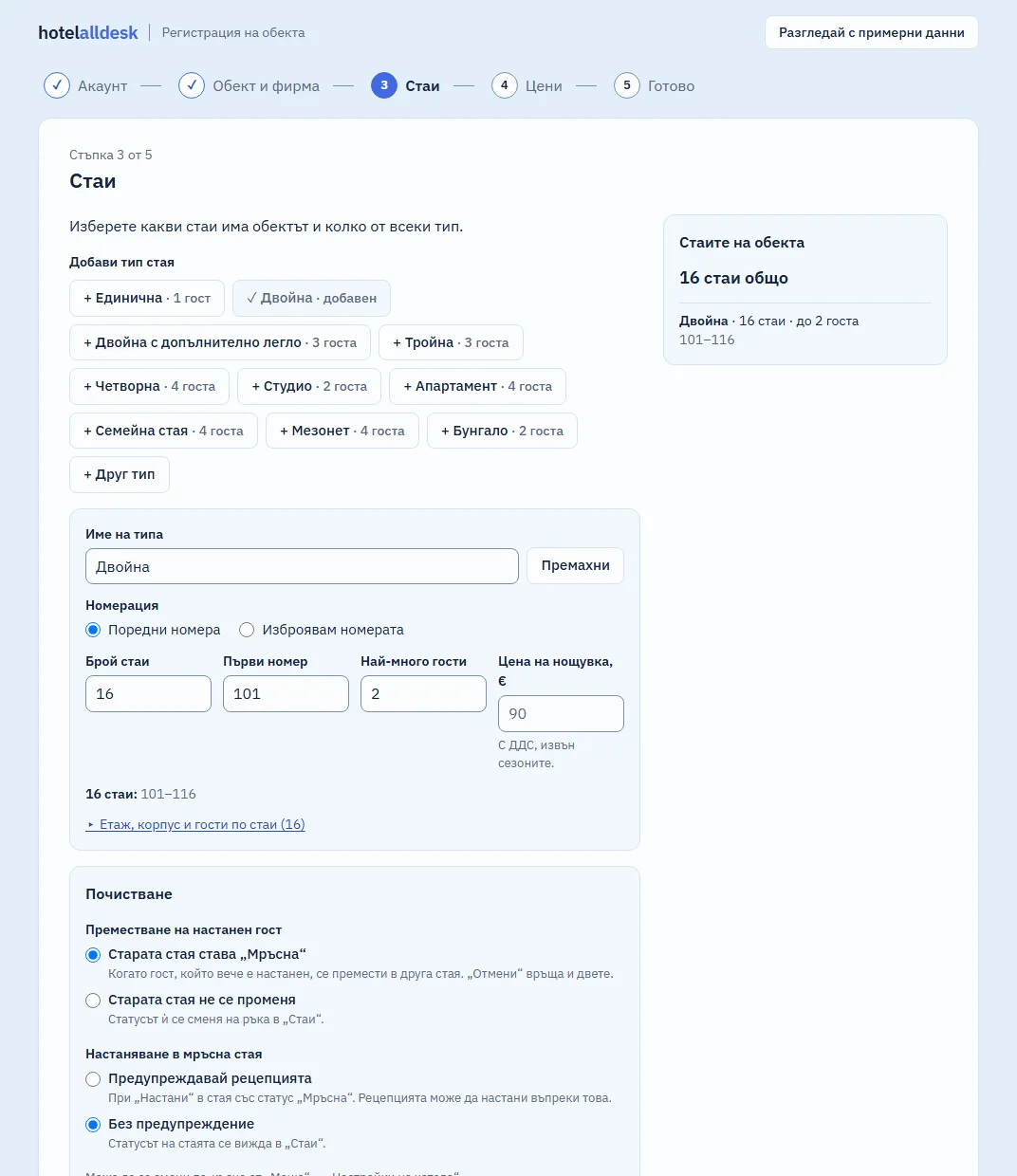
You sign up inside the system itself. Nobody from our side has to step in, and you do not send us a file.
Account
The email and password you will sign in with.
Property and company
The property's name, the company and its UIC (the Bulgarian company number), the municipality and the star category. The tourist tax is filled in from the municipal ordinance, and you choose whether it goes on top of the price.
Rooms
The room types and how many of each. The room numbers are assigned automatically.
Prices
A base price per night for each type, and seasons if you have them.
Done
A review, then “Open the calendar”.
The price will depend on the number of rooms
We will publish prices at launch.
The monthly price will have two parts: a base fee for the property and a fee for each room. We take no percentage of your bookings, and channels are included. You pay month to month with no annual contract, and you can cancel from the app yourself. The first month is free and needs no card; the second is 30% off.
- No fee for cancelled, fake or no-show bookings.
- Cancelling from the app with instant written confirmation, and an export of all your data: soon.
Short answers to the questions we hear most
What works today?
Working today: the room calendar, bookings with a price, check-in and check-out, cancellations with deposits, search and the Ctrl+K commands, the tourist tax, the daily report and hotel setup. Marked “soon”: ESTI submission, fiscal receipt printing, invoicing, the channel connection and online booking from the hotel's website. We remove the label only when a part starts working.
Can I start using the system now?
Not yet. HotelAllDesk is in development and not yet on sale. Until then the demo is available on request: email us at [email protected]. It is the system itself, with a sample 100-room hotel, and your changes disappear when you close the tab. We will announce the launch here.
Is the system available in English?
Not yet. The interface is in Bulgarian today, which is why the screens on this site are Bulgarian. An English interface is coming soon.
Do you work with hotels outside Bulgaria?
Not for now. The system is built around Bulgarian rules: ESTI, fiscal receipts and the municipal tourist tax. Other countries will come later.
How does submission to ESTI work?
Today the system records the guest details at check-in but does not send them. Submission is coming soon: automatic, system to system through RegiX (the Bulgarian state's data-exchange platform), at check-in, on every change and on cancellation. The connection needs a certificate in the property's name, and we will help with the paperwork.
Which fiscal printers will you support?
Datecs, Tremol, Daisy, Eltrade and Incotex, through a small program on the front-desk computer, with no paid box for each printer. Today the bill shows only a preview of the receipt.
What does it cost, and is there a contract?
We will publish prices at launch. The monthly price will have two parts, a base fee for the property and a fee for each room, never a percentage of bookings. You pay month to month with no annual contract. The first month is free, and the second is 30% off.
How do I cancel the subscription?
From the app, with written confirmation straight away; that part is coming soon. Once you ask, billing stops, and there is no exit fee.
Can I export all my data?
You will be able to at any time, including after you cancel: bookings, guests, invoices and payments. You will have at least 30 days after cancelling to download it.
Will it work without an internet connection?
Partly, and offline mode is not ready yet. During an outage the calendar will stay visible, read-only, and check-ins will be saved on the device and sent once the connection is back. There will be no new bookings or moves offline: the channels keep selling, and that is how double bookings happen.
Where will the data be stored?
In the European Union: the servers will be in AWS's Frankfurt region (eu-central-1). Before launch we will publish every provider that processes hotels' data.
Can a guest house without a company sign up?
Not for now: sign-up is for companies only and needs a UIC (ЕИК, the Bulgarian company number).
Email us at [email protected]
Ask us anything about the system or the launch. We reply from the same address.
While the system is in development, the demo is available on request. Email us and we will send you access to a sample 100-room hotel.
Ask for demo access